Can I Work From Home Comfortably in a New 2 BHK Flat in Noida?
Working from home has changed what buyers expect from a home. Earlier, a 2 BHK was mainly evaluated for bedroom size, living area, kitchen planning, and location. Today, professionals also want a home that supports video meetings, focused work hours, stable internet use, and a clear separation between personal and professional routines.
A well-designed 2 BHK flat in Noida can comfortably support a work-from-home lifestyle when the layout offers good natural light, ventilation, practical plug point placement, manageable noise levels, and enough room for a dedicated desk. For buyers exploring new flats in Noida, these factors can make a major difference in daily comfort.
Here are the key things to check before choosing a work-friendly home.
1. Check Whether the Second Bedroom Can Become a Home Office
The biggest advantage of a 2 BHK layout is flexibility. One bedroom can remain the primary sleeping space, while the second room can be used as a home office, study room, guest room, or a combination of these.
Before you buy a flat in Noida, assess whether the second bedroom has enough usable space for:
- A desk and ergonomic chair
- A laptop or desktop monitor
- Storage for documents and work essentials
- A small bookshelf or cabinet
- Comfortable walking space around the desk
A separate workroom is especially useful for professionals who attend frequent virtual meetings, handle confidential work, or need a quiet environment for long working hours.
If the second bedroom is compact, consider whether a corner of the living room can support a focused work zone without interrupting family movement.
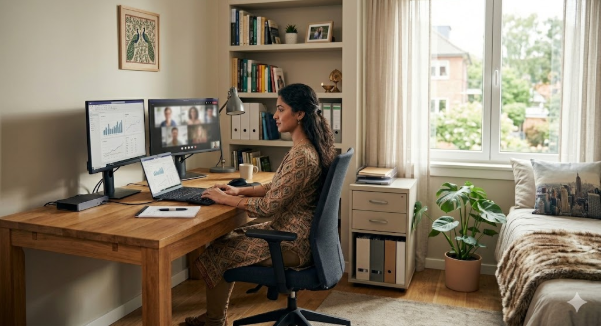
2. Choose a Desk Location That Uses Natural Light Wisely
Natural light can make a workspace feel more open, pleasant, and less dependent on artificial lighting. The pillar blog on natural light and ventilation highlights how well-planned windows, open layouts, and proper airflow can improve everyday living in apartments.
However, daylight should be balanced carefully in a home office. A desk placed directly in front of a bright window may cause screen glare. A desk with the window behind it can create shadows during video calls.
The best placement is usually:
- Perpendicular to the window
- Close enough to receive daylight
- Far enough away to avoid direct glare on the screen
- Positioned so that sunlight does not fall directly on the monitor
For example, if the room has a large east-facing or north-facing window, you may receive softer daylight for a comfortable work environment. The pillar blog also notes that north-facing windows can provide steady natural light, while east-facing windows allow morning sunlight.
3. Control Screen Glare Before It Affects Your Work Routine
Screen glare is one of the most overlooked issues when buyers inspect a flat. A room may look bright and attractive during a site visit, but excessive sunlight can make laptop work uncomfortable.
When comparing the best flats in Noida, check whether the workspace can accommodate blinds, curtains, or shades. These features can help you manage sunlight without blocking all natural light.
Use this quick glare-control checklist:
- Avoid placing the monitor directly opposite a window
- Avoid placing the monitor directly in front of a bright balcony door
- Use sheer curtains for filtered daylight
- Consider adjustable blinds for afternoon sunlight
- Choose a desk with enough depth to position the screen comfortably
- Test the room during the daytime if possible
A naturally bright room is valuable, but a work-friendly room should also allow you to control light throughout the day.
4. Plan a Professional Video-Call Background
Video calls have become part of everyday work for employees, consultants, business owners, and remote teams. A cluttered background can make even a well-designed home office feel distracting.
When choosing a 2 BHK flat in Noida, look for a wall that can serve as a clean video-call background. It could be a neutral wall, a simple bookshelf, a small indoor plant, or minimal artwork.
A good video-call setup should include:
- A clutter-free wall behind the chair
- Light falling on your face rather than behind you
- Enough distance between the chair and the background
- Limited movement from family members during meetings
- A stable desk that does not shake during calls
The second bedroom is usually more suitable than the living room for regular video calls because it provides privacy and reduces interruptions.
5. Count Plug Points Before Finalising the Flat
A work-from-home setup often needs more electrical points than buyers initially expect. A laptop alone may be manageable, but a complete setup may include a monitor, router, phone charger, desk lamp, printer, and power backup equipment.
Before selecting from new flats in Noida, inspect the location of plug points in the bedroom and living area.
Check whether there are enough sockets for:
- Laptop and monitor
- Wi-Fi router
- Mobile charger
- Desk lamp
- Printer or scanner
- Extension board if needed
- Backup power equipment
Ideally, the desk should be placed near a wall with accessible plug points. This reduces cable clutter and prevents the need for long extension wires across the room.
6. Evaluate Noise Levels During the Site Visit
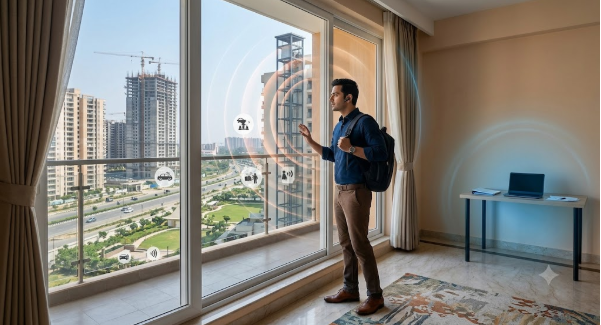
A spacious flat may still feel unsuitable for remote work if it faces a busy road, construction zone, clubhouse, lift lobby, or common corridor. Noise can affect concentration, call quality, and overall comfort.
When you plan to buy a flat in Noida, try to visit the property during working hours. Observe the sound levels near windows, balconies, and the room you may use as a home office.
Pay attention to:
- Traffic noise from nearby roads
- Construction activity around the project
- Sound from common areas
- Lift movement near the bedroom
- Noise from neighbouring apartments
- Activity around parks, schools, or clubhouses
If the room faces a noisy side, place the desk on an internal wall rather than directly beside the window. Rugs, curtains, bookshelves, and soft furnishings can also reduce echo inside the room.
7. Check Ventilation for Longer Working Hours
A workroom should not feel stuffy after a few hours. Proper ventilation can improve indoor comfort, especially when the room is used continuously throughout the day.
Cross-ventilation occurs when air enters and exits through openings on opposite sides of the home. The pillar blog explains that this airflow can help prevent stale indoor conditions and improve comfort across seasons.
When evaluating the best flats in Noida, check whether the work area has:
- A window that opens properly
- Access to fresh air
- Nearby balcony ventilation
- Adequate space around furniture
- No large cupboard blocking the window
Avoid placing tall storage units directly in front of windows, as they can reduce both daylight and airflow.
Conclusion
Yes, you can work from home comfortably in a new 2 BHK flat in Noida when the layout supports both professional and personal routines. The right home should offer a quiet room or adaptable corner, balanced natural light, low screen glare, enough plug points, a professional video-call background, and healthy ventilation.
When comparing new flats in Noida, do not only focus on carpet area or amenities. Assess how easily the flat can support your actual workday. A work-ready 2 BHK can offer long-term flexibility for remote work, hybrid schedules, family needs, and future lifestyle changes.
FAQs
1. Is a 2 BHK flat in Noida enough for work from home?
Yes, a 2 BHK can be suitable for work from home if the second bedroom or a quiet corner can accommodate a desk, chair, storage, and internet setup.
2. Where should I place my desk in a 2 BHK flat?
Place the desk perpendicular to a window where possible. This allows natural light without causing direct glare on the screen.
3. How can I reduce video-call noise at home?
Choose a room away from busy roads, corridors, and common areas. Use curtains, rugs, bookshelves, and soft furnishings to reduce echo.
4. How many plug points should a home office have?
A home office should ideally have enough plug points for a laptop, monitor, router, charger, desk lamp, printer, and backup power equipment.
5. Should I check the flat during the day before buying?
Yes, daytime visits help you assess natural light, glare, ventilation, traffic noise, and the practicality of desk placement.